Patient education, elevated

The Meric chart your patients
finally understand.

The classic nervous-system chart, made interactive. On your screen during the visit, and in their hands when they leave.

The Meric Board is a downloadable, browser-based Meric chart for your office. Click any concern and the related spinal levels light up, color-coded by region. Save a branded handout with your practice name on it. No cloud. No monthly fee.

Get The Meric Board $57
One-time purchase. No subscription.
Local browser-based file. No monthly software fee.
Sound familiar?

The chart has not changed
since chiropractic school. Your practice has.

01
The Wall Poster

It has been on the wall so long you do not see it anymore. Neither do your patients. Their eyes pass right over it on the way back to their phone.

02
The Glaze

You are mid report of findings, pointing at the spine, explaining a connection you can see clearly. You watch their eyes and you can tell the exact second it stops landing.

03
The Photocopy

The handout is a photocopied chart with pen circles on it. It leaves your office folded into a pocket and never gets looked at again.

04
The Same Chart as Everyone

Every office has the same laminated chart from the same catalog. Nothing about it says your practice, your standard of care, or why this visit was different.

The solution

The same trusted chart.
Finally alive.

The Meric Board takes the chart chiropractors have taught from for a century and puts it on your screen, where the conversation happens. Click the concern your patient came in with, and the related spinal levels light up in front of them, color-coded by region. They stop politely nodding and start watching their own story connect.

  • Click any concern and the related levels light up instantly
  • Every spinal region carries its own color, with a simple key patients can follow
  • Tap any vertebra to go deeper into what it connects to
  • Mark the main concern so it stands out on screen and on the handout
  • Save a branded handout with your practice name, ready for the patient
  • Your practice name is saved once and prints automatically every time
  • No cloud, no account, no monthly fee. One file that opens in your browser
Why interactive matters

A wall poster asks the patient to find themselves in a sea of lines. The Meric Board does the opposite. It starts with their concern and shows only what connects to it.

When a patient watches their own symptoms light up the spine, the understanding does not have to be explained twice. That is the moment care plans start making sense.

A closer look

On your screen. In their hands.

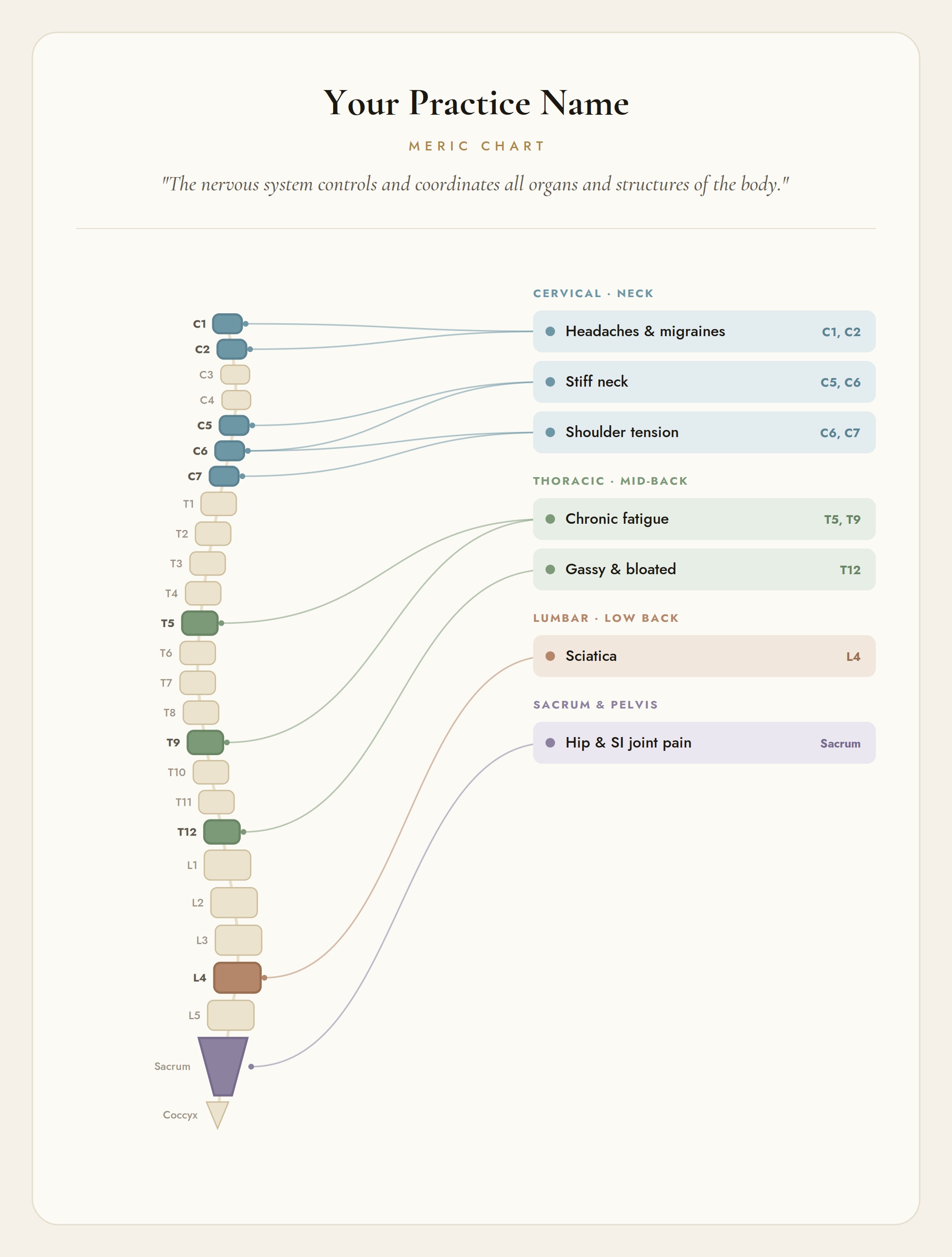
The Meric Board interactive chart with spinal levels lit up and color-coded by region.
The Interactive Chart
Click any concern and the related spinal levels light up, color-coded by region, while the patient watches.
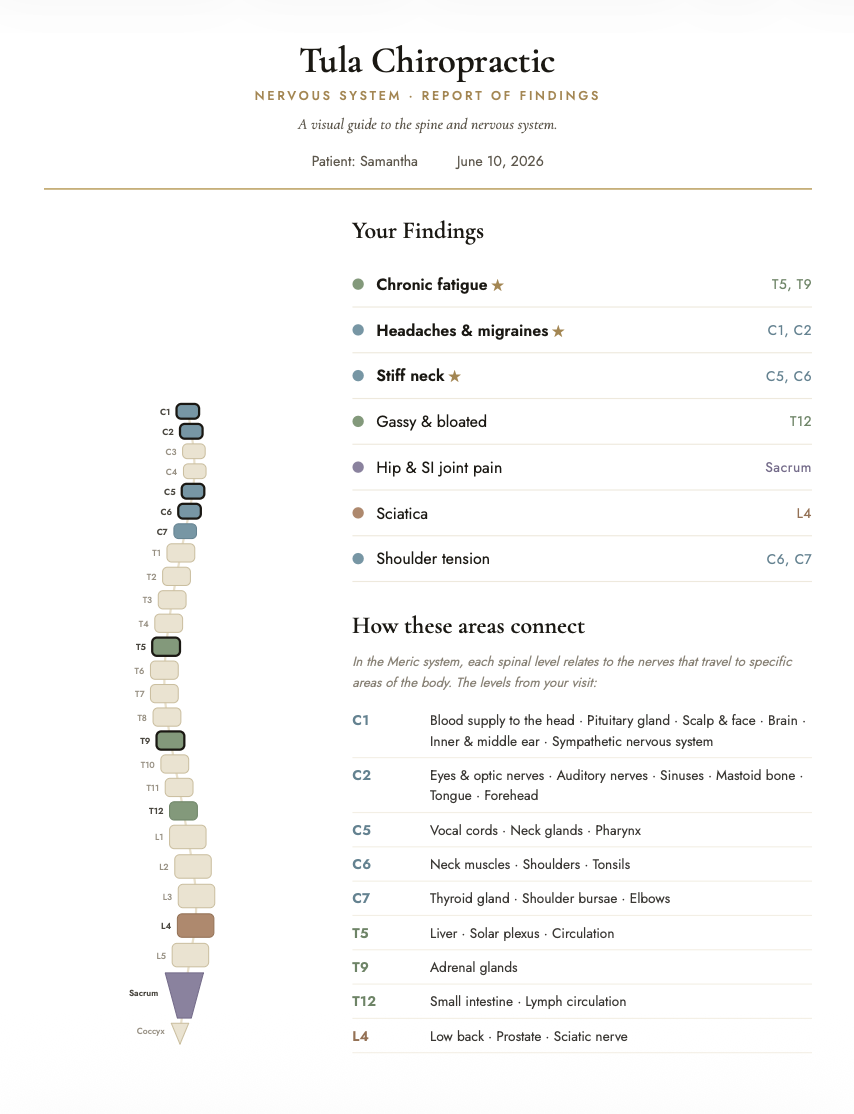
The branded, report-of-findings-ready handout the Meric Board produces.
The Branded Handout
A branded, report-of-findings-ready handout with your practice name on it, for your patients.
One chart, many ways to use it

It fits the way you already practice.

Run it live in your ROF

Open it on your screen and click through the patient's concerns as you talk. The chart becomes the conversation.

Build it into your flow

Make it a standing part of every new patient visit, so every report of findings looks and feels like your practice.

Print the handout

Save the branded PDF with the patient's selections and your practice name. A take-home that gets kept.

Keep it open all day

Leave it up in the adjusting room for the questions patients ask mid-visit. Two clicks and they can see the answer.

Everything included

One purchase. Nothing left out.

01
The Meric Board File

One self-contained file. Download, double-click, and it opens in Chrome, Safari, or Edge. Works on Mac and PC. Nothing to install.

02
Interactive Spine

All twenty-six levels, cervical through coccyx, each one clickable with its own connections and a go-deeper layer for the curious patient.

03
Concern Mapping

Common patient concerns organized by region. Click one and every related level lights up, color-coded, with leader lines tracing the connection.

04
Main Concern Marker

Star the concern that brought them in. It stands out on screen and leads the list on the printed handout.

05
Branded Handout

A clean, report-of-findings-ready sheet with your practice name, the patient's selections, the lit-up spine, and room for your notes.

06
Set-Once Practice Name

Type your practice name one time. It saves on your office computer and appears on every handout automatically after that.

How it works

Up and running in about a minute.

1
Download

Download the file and double-click it. It opens in your browser. Nothing to install.

2
Set it up

Enter your practice name once. It is saved for every time after.

3
Click through it

During the visit, click the concerns you are discussing. The spine lights up as you talk.

4
Send it home

Save the branded handout as a PDF for your patient.

Good questions

Before you decide.

Is this hard to set up?
It is one file. You download it, double-click it, and it opens in your browser. Your front desk can set it up in about a minute. There is nothing to install, no account to create, no technical knowledge required.
Does it store patient information?
The patient name and notes you type exist only for the handout you save, and the tool does not transmit anything on its own. Your practice name is the only thing saved on your computer. Each practice remains responsible for its own privacy and recordkeeping policies, and for deciding how the tool fits within them.
Does this replace my report of findings?
No. The Meric Board is the visual aid inside it. You bring the clinical conversation, the exam, and the care plan. The Board makes the connection visible while you explain it. It is an educational visual aid, not a diagnostic tool.
Is there a monthly subscription?
No. The Meric Board is a one-time purchase. You pay $57 once and it is yours. No recurring fee, no software bill, no renewal.
Can my whole team use it?
Yes. The license covers a single practice. Open it on the office computer, the adjusting room screen, or the front desk monitor, and the whole team works from the same chart.
Simple pricing

One chart. A dozen ways to use it.

An interactive report of findings. A patient education screen. A branded take-home. The Meric Board is one purchase that works as many ways as your practice does.

$57
One-time · Instant download
  • The Meric Board file, full interactive version
  • Click-to-light-up spine, color-coded by region
  • Go-deeper detail on all twenty-six levels
  • Main concern marker for the handout
  • Branded, report-of-findings-ready handout
  • Practice name saved once, prints automatically
  • No cloud · No account · No monthly fee
  • Single-practice license
Get The Meric Board · $57 →

Secure checkout. Instant digital delivery after purchase.
Sold under a single-practice license. Not for resale or redistribution.