Built by a prenatal chiropractor

Sticky notes.
Chart digging.
Phone calculators.
Not anymore.

Your whole office deserves to know where every mama is before she walks through the door.

The Bump Board is a downloadable, browser-based prenatal patient dashboard for chiropractic offices. It is designed to track gestational weeks, care milestones, birth prep, and postpartum follow-up in one shared view. Open it any day and every patient's week is already right. No one has to recalculate it.

Get The Bump Board $97
One-time purchase. No subscription.
Local browser-based file. No monthly software fee.
Built by a prenatal chiropractor · One-time purchase · Internal office use · No monthly fee · Includes 14 days of setup support
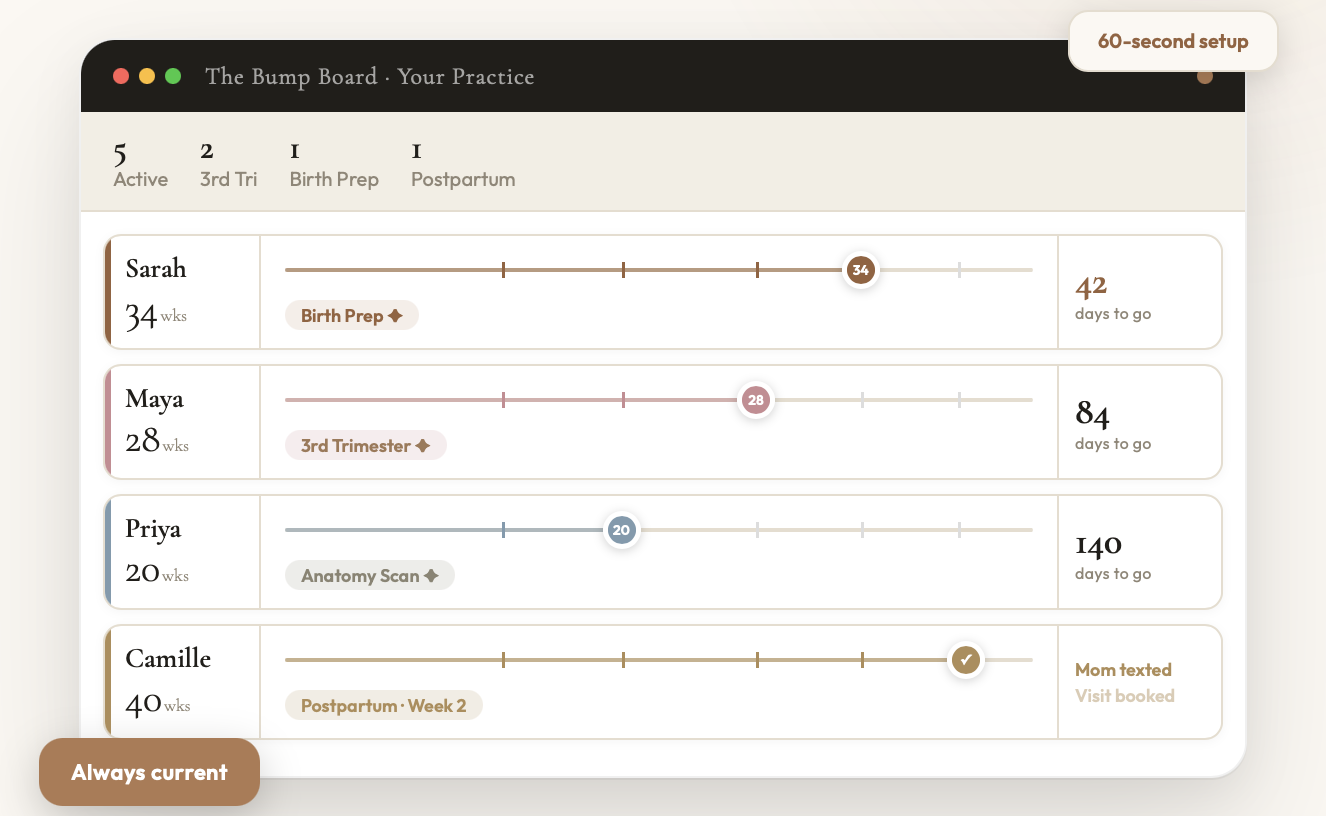
The Bump Board · Your Practice
5Active
23rd Tri
1Birth Prep
1Postpartum
Sarah
34wks
34
Birth Prep ✦
42
days to go
Maya
28wks
28
3rd Trimester ✦
84
days to go
Priya
20wks
20
Anatomy Scan ✦
140
days to go
Camille
40wks
Postpartum · Week 2
Mom texted
Visit booked
Always current
60-second setup
Unlimited patients/ Always current/ Milestone alerts built in/ Postpartum follow-up checklist/ No cloud, no subscription/ 60-second setup/ Color coded by gender/ Twins supported/ Customizable milestone guide/ Unlimited patients/ Always current/ Milestone alerts built in/ Postpartum follow-up checklist/ No cloud, no subscription/ 60-second setup/ Color coded by gender/ Twins supported/ Customizable milestone guide/

"I built this because I got tired of losing track of pregnant patients. Tired of being the only one in the office who knew where they were."

I am a prenatal and pediatric chiropractor. I see pregnant mamas from their first trimester through postpartum. For years, tracking them meant a mental load I carried alone. A spreadsheet I updated when I remembered. A sticky note that meant nothing to anyone but me.

When I missed a week, everything fell off. I would be mid-appointment, reaching for my phone to recalculate how far along she was, doing the math right in front of her. Quietly pulling out your phone to figure out a patient you care about is not the practitioner any of us set out to be.

I built the Bump Board because I needed it. And then I decided other practices deserved it too.

Webster Certified · Prenatal & Pediatric Chiropractor · Practice Owner
Dr. Aanchal, prenatal and pediatric chiropractor and founder of The Bump Board.
Built to give providers their time back
The practitioner behind it

Hi, I'm Dr. Aanchal.
I built this for mamas like mine.

Prenatal & Pediatric Chiropractor · Practice Owner · Mom

I care for pregnant mamas every week, and I am also raising my own little one. As a busy mom myself, keeping track of every patient's pregnancy got harder, not easier.

If a mama missed her regularly scheduled appointment, or if I was out of the office tending to my own baby, I would come back and have to recalculate every single one of my mamas' pregnancies. Digging through notes, counting weeks, rebuilding the whole picture in my head.

I wanted a clear system that could track and guide my mamas better, without me reading through every single note.

I needed efficiency. I needed my time back. So I built the Bump Board. It is the tool I wished I had every time I walked back into my practice and had to start from scratch.
Sound familiar?

You built your practice
on precision.
Your tracking did not.

01
The Phone Calculator Moment

You are mid-appointment. You realize you do not know exactly how far along she is. You reach for your phone. She watches you do the math. Fifteen seconds. Feels like an hour.

02
The Chart Dig

Your front desk needs to know where a patient is before she walks in. They open chart notes from three months ago and start counting backwards. This is not a system. This is a workaround.

03
The Milestone You Missed

Week 34 is the birth prep window. The conversation changes. The care changes. But only if you know she is there. A missed milestone is not just operational. It changes the conversation your team is prepared to have.

04
The Postpartum Drop-Off

She delivered. You have no system that tells your office she exists. She is not lost. She is uninformed, and that is on the practice, not on her.

The solution

One screen.
Every mama.
Always current.

The Bump Board lives on your office monitor. Every prenatal patient has her own lane: a clean visual timeline showing exactly where she is, which milestone she just hit, and what needs to happen next. The weeks update automatically, so no one has to recalculate where each patient is.

  • Automatic gestational week calculation, no math ever
  • Milestone alerts at weeks 13, 20, 28, 34, and 40
  • Customizable milestone guide: rewrite what each milestone says to match your practice's protocols
  • Birth prep urgency signal at week 34, visible to the whole office
  • Baby Arrived → postpartum follow-up checklist in one click
  • Unlimited patients · Color-coded by gender · Twins supported
  • Three color palettes · Your practice name and branding built in
  • No cloud · No monthly fee · Patient data never leaves your office
Milestone Reference · Always visible
WindowAction
Wk 1–12Weekly or bi-weekly care
Wk 13 ✦2nd Trimester begins
Wk 20 ✦Anatomy scan week
Wk 28 ✦Weekly visits · Home birth prep
Wk 34 ✦2x / week · Begin postpartum prep
Wk 40 ✦Full term
Up and running in 60 seconds
1
Download and double-click the file
2
Enter your practice name · Pick a palette
3
Add your first patient. You are live.
Before you wonder

The questions every
prenatal chiropractor asks
before they buy.

1
"Is this hard to set up?"

It is one file. You download it, double-click it, and it opens in your browser. Your front desk can set it up in sixty seconds without calling anyone. There is nothing to install, no account to create, no technical knowledge required.

2
"My practice is small. Do I really need this?"

If you see even three prenatal patients at a time, you have felt the tracking problem. The Bump Board is most useful when you are small enough that the owner is still doing the mental math. That is exactly who this was built for.

3
How does this handle patient privacy?

The Bump Board stores its data locally in your browser on your office computer. The tool does not transmit data on its own. We recommend practices use first names, initials, or an internal naming convention rather than full patient names. Each practice remains responsible for its own HIPAA, privacy, and recordkeeping policies, and for deciding how the tool fits within them.

4
"What do I actually get for $97?"

A tool built by a prenatal chiropractor who lived the problem you are living. One file, one purchase, no subscription, no recurring cost. Your EHR costs $89–$150 a month. This costs $97 once, less than two patient visits. The math is not complicated.

Questions about setup? I've got you. Reach out within two weeks of purchase and I will personally help you get it running. Practitioner to practitioner. No ticket system, no chatbot.
Who this is for

If you see prenatal patients,
this is for you.

i
The Prenatal Specialist

You see pregnant mamas every week. You know each one personally. You have been doing this tracking in your head or on a spreadsheet and you know it is not working at the level you want.

ii
The Prenatal + Pediatric Practice

Your patients come in pregnant and stay through their baby's first year. The Bump Board tracks the pregnancy journey and the postpartum follow-up so nobody falls between the cracks.

iii
The Practice With a Team

You have a front desk, an associate, maybe a part-time CA. The Bump Board gives your whole team a shared, always-current view. Nobody has to ask. Nobody has to dig through notes.

A real morning

How your front desk
actually uses it.

8:45 AM
Your front desk or CA opens The Bump Board on the office monitor before the first patient arrives. Every prenatal patient is already on screen, every week already current.
8:47 AM
A quick glance shows who is where. Two patients in the third trimester. One who just hit the week 34 birth prep window, flagged so the whole team sees it.
9:10 AM
A prenatal patient checks in. Before she reaches the front desk, the team already knows she is at 28 weeks. No chart dig. No counting backward. No asking the doctor.
Throughout
When a baby arrives, one click moves mom into the postpartum follow-up view, so the check-in and Mommy and Me visit never slip through the cracks.
A closer look inside

See exactly
what you get.

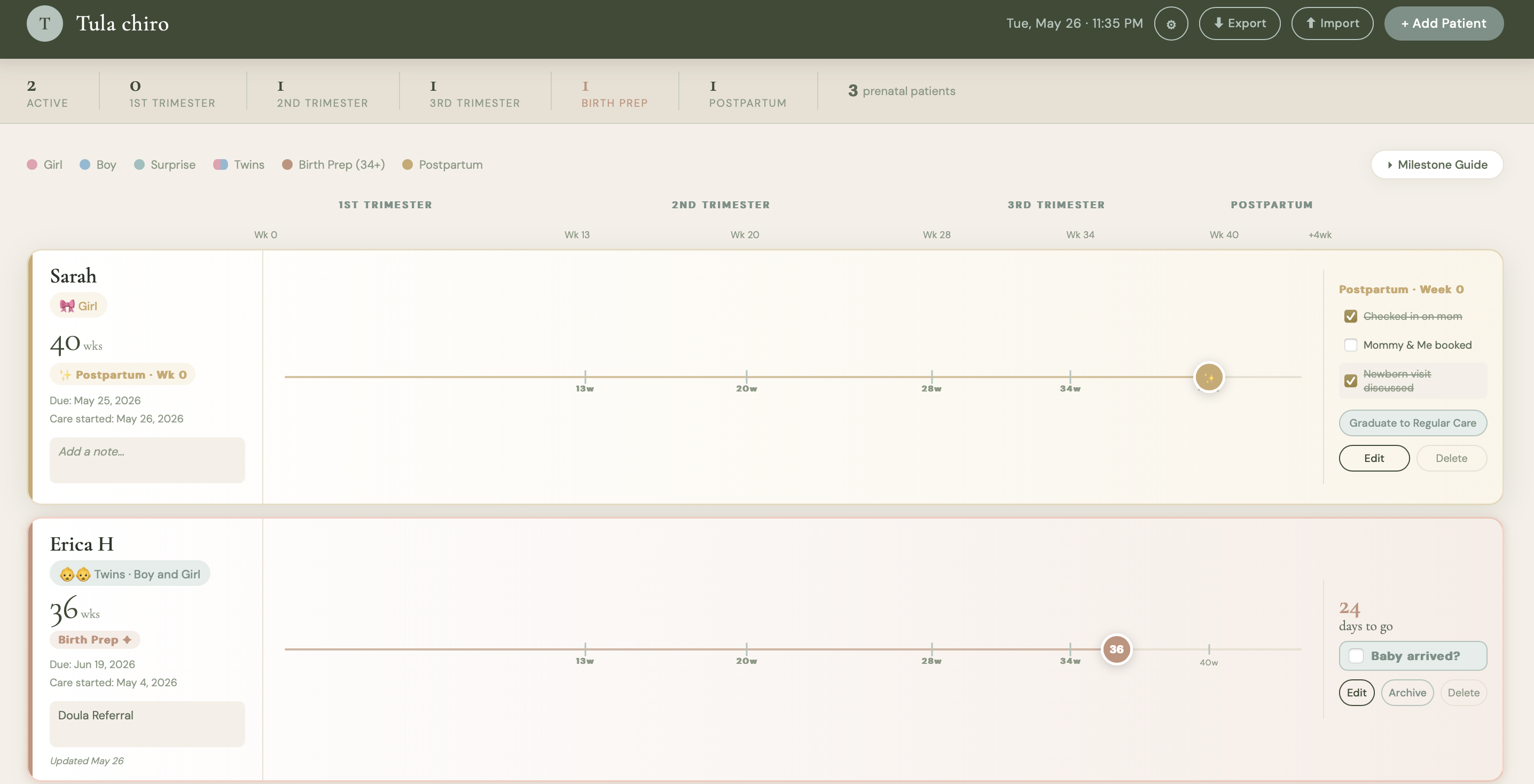
The Bump Board main dashboard showing prenatal patient lanes, trimester bands, and milestone flags.
The Dashboard
Every prenatal patient on one shared timeline. Color coded by gender, organized by trimester, always current the moment you open it.
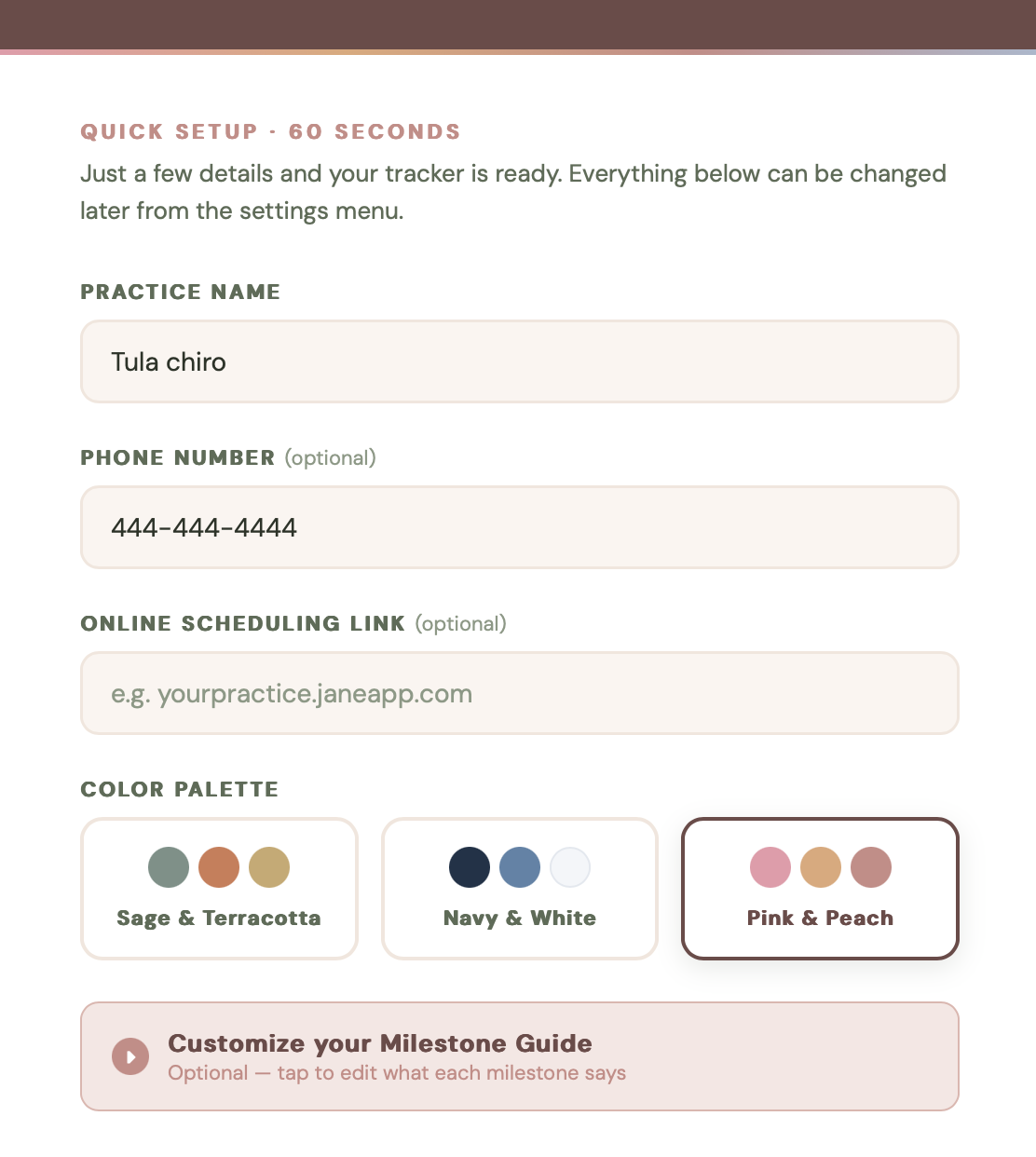
The Bump Board 60-second practice setup screen.
The 60-Second Setup
Practice name, color palette, and a milestone guide you can make your own. Up and running in about a minute.
The Bump Board postpartum follow-up checklist view.
Postpartum Follow-Up
When baby arrives, the follow-up checklist keeps mom from slipping away. Check-in, Mommy and Me, newborn visit.
Everything included

One purchase.
Nothing left out.

01
The Bump Board File

One self-contained file. Download, double-click, open in Chrome or Safari. Works on Mac and PC. No installation required.

02
Practice Setup Screen

60-second first-run setup. Practice name, three color palettes, customizable milestone guide. Yours from minute one.

03
Auto-Updating Tracker

Gestational weeks calculate automatically from each due date. Open the board any day and every patient's week is already right. No one has to recalculate it.

04
Customizable Milestone Guide

Visual flags at weeks 13, 20, 28, 34, and 40, plus a built-in reference guide you can fully rewrite to match your own protocols. Your weeks, your language, your way of working.

05
Postpartum Checklist

Baby arrives → checklist activates. Checked in on mom. Mommy and Me booked. Newborn visit discussed. No drop-offs.

06
Export + Import Backup

Export all your data with one click. Move to a new computer by importing your backup. Nothing ever gets lost.

07
Quick Start PDF Guide

A beautifully designed Quick Start guide that walks your team through opening the file, first-run setup, and getting your first patients on the board.

08
Two Weeks of Personal Setup Support

Email me within 14 days of purchase and I will personally help you get the tracker running. Practitioner to practitioner. No ticket system, no chatbot.

Honest fit check

This is not for you
if you need...

A cloud platform that syncs across multiple locations automatically.
Patient-facing messaging, logins, or a patient portal.
A replacement for your EHR or official medical record.
A system that backs itself up without anyone exporting a file.
A mobile app for phones. The Bump Board is built for a desktop or office monitor.
Simple from the start

What happens
after you buy.

1
Purchase
Check out securely through Payhip. It takes about a minute.
2
Download the kit
Instantly download your tracker file and the Quick Start PDF guide.
3
Open in your browser
Double-click the file. It opens in Chrome, Safari, or Edge. Run the 60-second setup.
4
Email if you need help
Within 14 days, email me with any setup question and I will help you personally.
Good questions

Before you
decide.

Is there a monthly subscription?
No. The Bump Board is a one-time purchase. You pay $97 once and the tracker is yours. There is no recurring fee and no software bill.
Does it message patients or give them a login?
No. The Bump Board is an internal tool for your team only. It does not contact patients, and patients do not log in or see it.
Does this replace my EHR?
No. The Bump Board is a tracking and workflow tool, not an EHR. It does not replace clinical documentation and should not be used as your official medical record. It sits alongside your existing systems.
Where is the data stored?
Data is stored locally in the browser on the computer where you use it. The tool does not transmit data on its own. Because the data lives in your browser, we strongly recommend exporting a backup file regularly so your information is safe if anything happens to the computer or browser.
What if I move to a new computer?
Export a backup from the old computer, open the tracker on the new one, and import the backup. Your patients and settings move with you. This is also why regular backups matter.
Can my whole team use it?
Yes. The Bump Board is designed as a shared view for everyone in one practice. The license covers a single practice. Open it on the office computer or monitor and the whole team works from the same board.
What kind of support is included?
Every purchase includes two weeks of personal setup support. If you have trouble opening or setting up your tracker, email me within 14 days and I will personally help you get it running.
The investment

Built like a tool
worth far more.

Most practice software costs $89 to $150 every month, forever.
The Bump Board is one payment. Then it is simply yours.

$97
One-time · Instant download
  • The Bump Board tracker file, full version
  • Unlimited patient lanes
  • Automatic gestational week tracking
  • Milestone flags at weeks 13, 20, 28, 34, 40
  • Customizable milestone guide
  • Postpartum follow-up workflow
  • Practice setup with 3 color palettes
  • Export and import backup system
  • Beautiful Quick Start PDF guide
  • Privacy and backup instructions
  • Single-practice license
  • Two weeks of personal setup support
Get The Bump Board — $97
Secure checkout. Instant digital delivery after purchase.

Set up in about 60 seconds · Best on desktop, laptop, or office monitor

A single month of practice management software costs more than this.
The Bump Board costs $97 once, less than two patient visits, and never bills you again.

Because this is a digital download, all sales are final. If you have trouble opening or setting up your tracker, email me within 14 days and I will personally help you get it running.

The Bump Board is sold under a single-practice license. It is intended for use within one practice and is not for resale or redistribution.

The Bump Board is an internal tracking and workflow tool. It is not an EHR, does not replace clinical documentation, and should not be used as the official medical record.

Best used on a desktop, laptop, or office monitor. It is not designed as a mobile app. For the best experience, open it in Chrome, Safari, or Edge on a desktop or laptop.